How it works
- Open 02 Setup. Enter the change, the area, the start of week 1 (a Monday), the status date and the targets.
- Score the impact per group in 03 Impact. Groups with a total of 8 or more need individual attention.
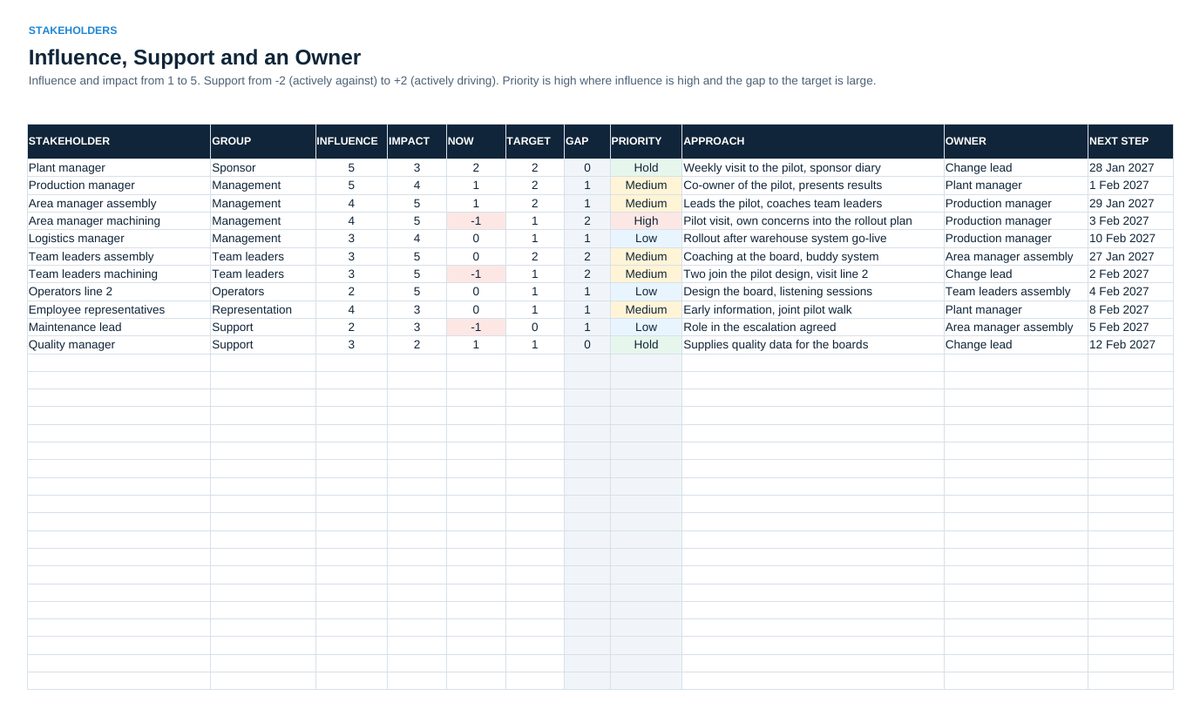
- Map the key people in 04 Stakeholders with influence, support now and target, an approach and an owner.
- List every communication, training, involvement and leadership action in 05 Plan, with owner and due date.
- Every week: enter meetings and audits in 06 Adoption, set the status date, read 07 Status in the adoption review.
Definitions used in the workbook
- Usage: Meetings held divided by meetings planned. Measures whether the new routine takes place.
- Proficiency: Standard work audits passed divided by audits done. Measures whether the new way is done well.
- Priority of a stakeholder: Gap between target and current support, times influence. 8 or more is high, 4 to 7 medium, below 4 low. No gap means hold.
- Overall color: Red when usage is more than 15 points below target or more than 3 actions are overdue. Amber when a target is missed, a stakeholder has high priority or an action is overdue. Otherwise green.
Sheets in the workbook
- Start
- Setup
- Impact
- Stakeholders
- Plan
- Adoption
- Status
Who it is for
Managers and project leads who introduce a change in operations.
The method behind the numbers
This workbook is part of the Change Management toolkits. The Starter Kit adds the guide and the checklist for the first 30 days. The Excellence Bundle adds playbook, workshop pack, templates, deck and the complete Excel system.