How it works
- Open 06 Setup. Enter up to seven KPIs with board row, unit, direction, target and owner. Check the settings for red hours and targets.
- Fill one row per shift in 02 Daily KPI Log. Red and green calculate from the target.
- Use 03 Hour by Hour for one shift at a time: plan and actual per hour, with the reason for every red hour.
- Every red gets a line in 04 Problem List with cause, action, owner and due date before the next meeting.
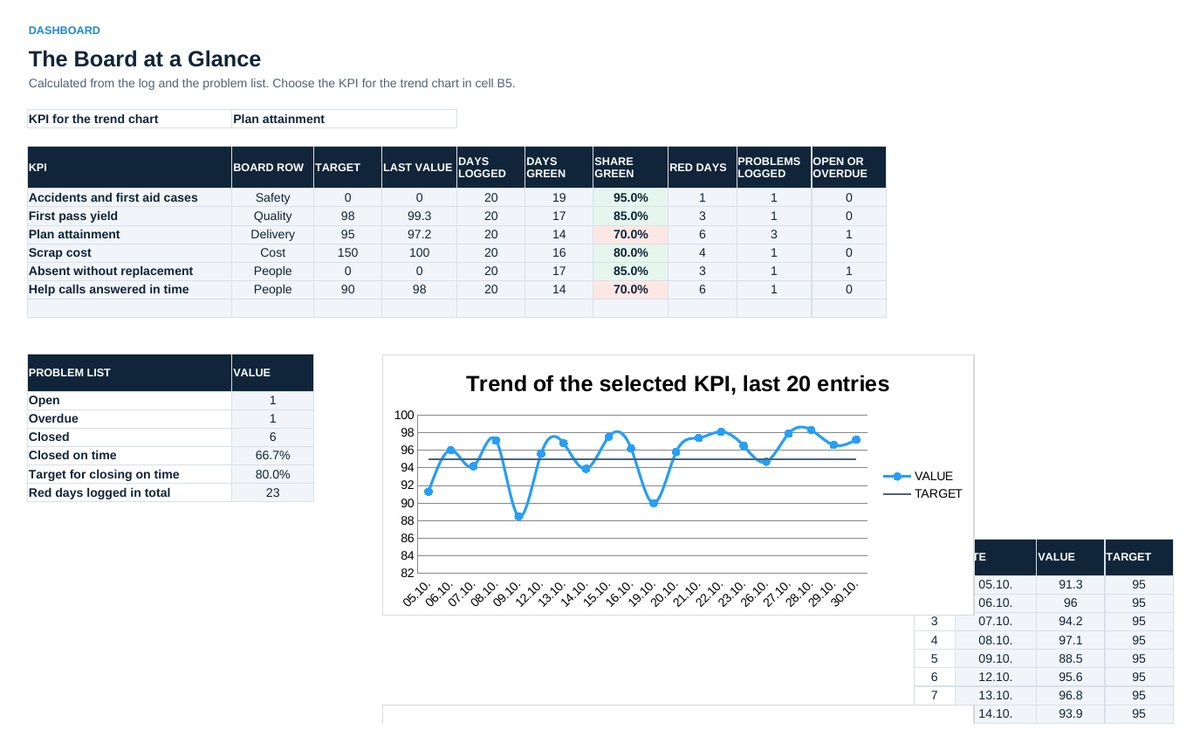
- Read 05 Dashboard in the weekly review: share of green days per KPI, the trend of one KPI, open and overdue problems.
Sheets in the workbook
- Start
- Daily KPI Log
- Hour by Hour
- Problem List
- Dashboard
- Setup
Who it is for
Team leaders and supervisors who run daily shop floor meetings.
The method behind the numbers
This workbook is part of the Visual and Shop Floor Management toolkits. The Starter Kit adds the guide and the checklist for the first 30 days. The Excellence Bundle adds playbook, workshop pack, templates, deck and the complete Excel system.