How it works
- Open 06 Lists and enter the tasks of your team, with target coverage and whether the task is critical. Twelve tasks at most.
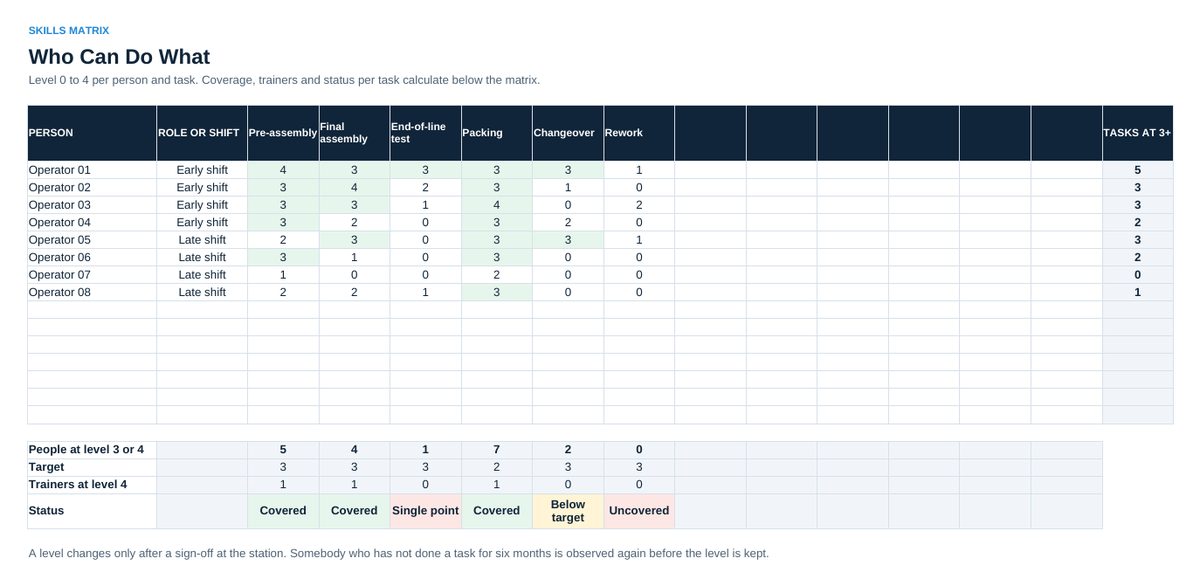
- Enter every team member in 02 Skills Matrix and a level from 0 to 4 per task. Confirm every level at the station, not in a meeting.
- Track every new starter in 03 Onboarding. Enter the date when a step is done. Progress and status calculate.
- Read 04 Dashboard in the weekly review: coverage per task, single points of failure, uncovered tasks, onboarding progress.
- Agree one action per week in 05 Action Plan, with owner and date.
Definitions used in the workbook
- Levels: 0 not trained, 1 knows the theory, 2 with support, 3 alone to standard, 4 trains others.
- Coverage: People at level 3 or 4 for a task. Compared with the target per task.
- Single point: A task with exactly one person at level 3 or 4. Uncovered: nobody at level 3 or 4.
- Flexibility: Qualifications at level 3 or 4, divided by people times tasks.
Sheets in the workbook
- Start
- Lists
- Skills Matrix
- Onboarding
- Dashboard
- Action Plan
Who it is for
Team leaders and supervisors who plan shifts, training and onboarding.
The method behind the numbers
This workbook is part of the People and Teamwork toolkits. The Starter Kit adds the guide and the checklist for the first 30 days. The Excellence Bundle adds playbook, workshop pack, templates, deck and the complete Excel system.