How it works
- Enter the cost of your plant or area by type in 02 Cost Map and mark what is fixed and variable.
- Calculate the machine hour rate of your bottleneck and the labor hour rate in 03 Rates.
- Calculate the cost per part, contribution margin and break-even of your main product in 04 Part Cost. Use column C for scenarios.
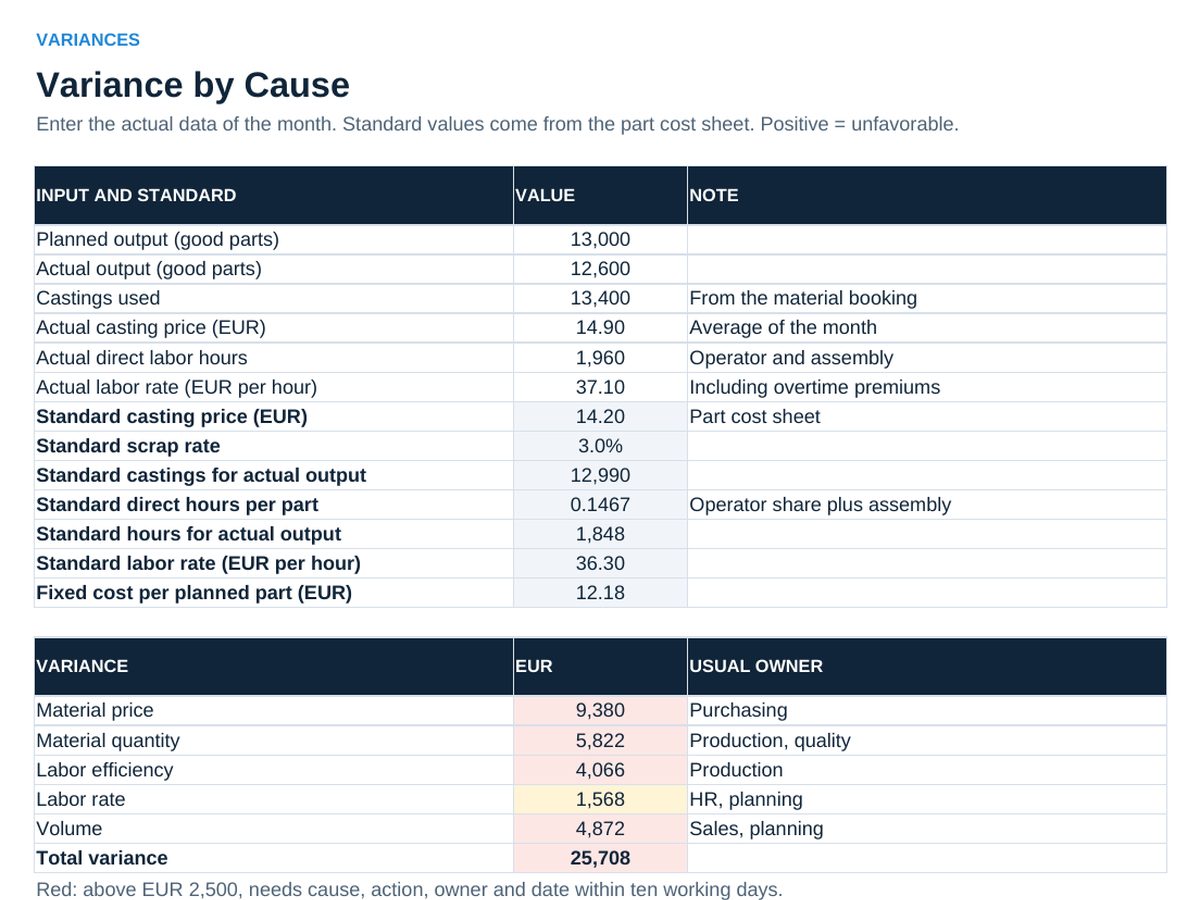
- Every month: enter planned and actual output and actual costs in 05 Budget, the actual data in 06 Variances, and agree actions in 07 Actions.
Definitions used in the workbook
- Machine hour rate: All machine costs of a year (depreciation, capital cost, space, energy, maintenance, tools) divided by planned running hours.
- Conversion cost: Machining, operator, setup, assembly and test. Everything between material and finished part.
- Contribution margin: Price minus variable cost. It pays the fixed costs first, then the profit.
- Flexed budget: Variable costs at actual output, fixed costs at plan. The fair basis for comparing actual costs.
Sheets in the workbook
- Start
- Cost Map
- Rates
- Part Cost
- Budget
- Variances
- Actions
Who it is for
Plant and area managers who want to talk numbers with controlling.
The method behind the numbers
This workbook is part of the Cost and Controlling toolkits. The Starter Kit adds the guide and the checklist for the first 30 days. The Excellence Bundle adds playbook, workshop pack, templates, deck and the complete Excel system.