How it works
- Open 02 Setup. Enter the area, shifts, hours, working weeks and the values for the business case.
- List the use cases in 03 Use Cases and score value, effort and data readiness. Start the top two or three.
- Write every signal in 04 Data Points with meaning, source and owner before machines are connected.
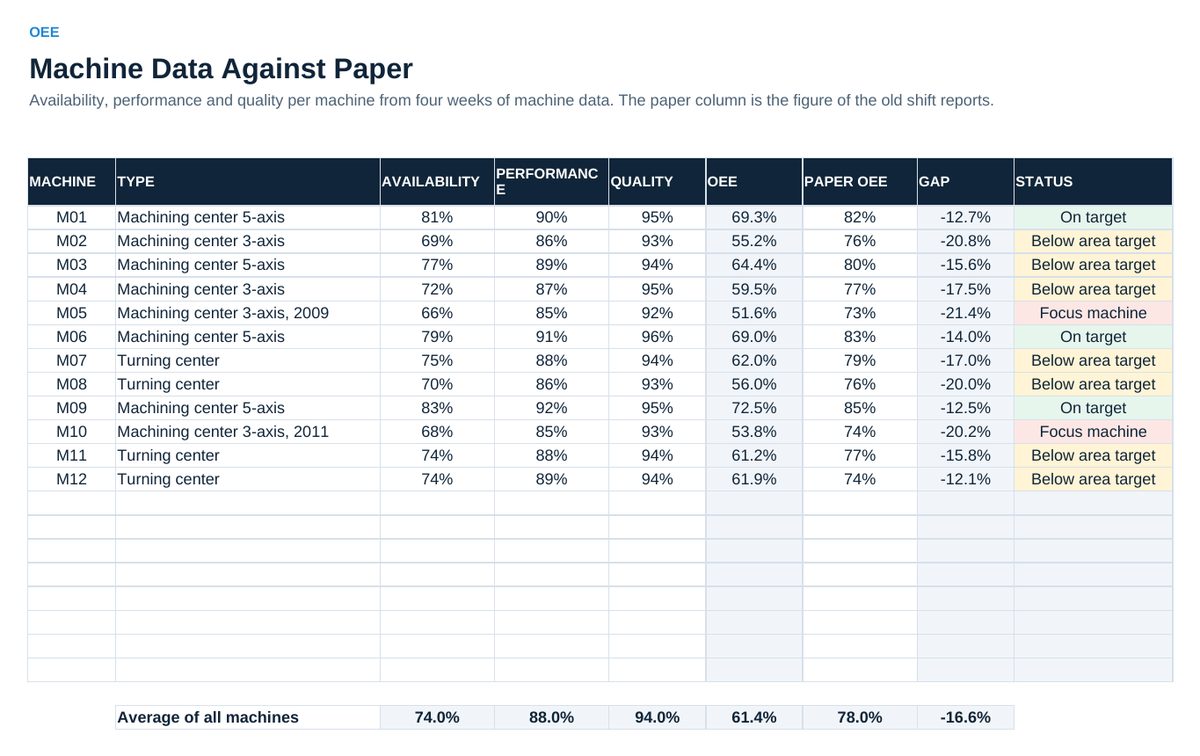
- Enter availability, performance and quality per machine in 05 OEE, next to the old paper figure.
- Enter stop minutes per reason in 06 Losses every week. Act on the top three in the daily meeting.
- Plan the waves in 07 Roadmap and check the business case in 08 Business Case.
Definitions used in the workbook
- Score of a use case: Value times 2 plus data readiness minus effort, each from 1 to 5.
- Status of a machine: Focus machine below 55 percent OEE, otherwise compared with the area target in 05 OEE. Check master data when performance or quality is above 100 percent.
Sheets in the workbook
- Start
- Setup
- Use Cases
- Data Points
- OEE
- Losses
- Roadmap
- Business Case
Who it is for
Production and IT/OT leads who digitize the shop floor step by step.
The method behind the numbers
This workbook is part of the Digital Shop Floor toolkits. The Starter Kit adds the guide and the checklist for the first 30 days. The Excellence Bundle adds playbook, workshop pack, templates, deck and the complete Excel system.