How it works
- Open 02 Setup. Enter the area, the number of technicians, hours, absence, the emergency reserve and the status date.
- Score every asset in 03 Assets. Class A, B or C calculates. Score together with production.
- Record every job in 04 Work Orders, emergencies included. Set the status to Ready only when the job is prepared.
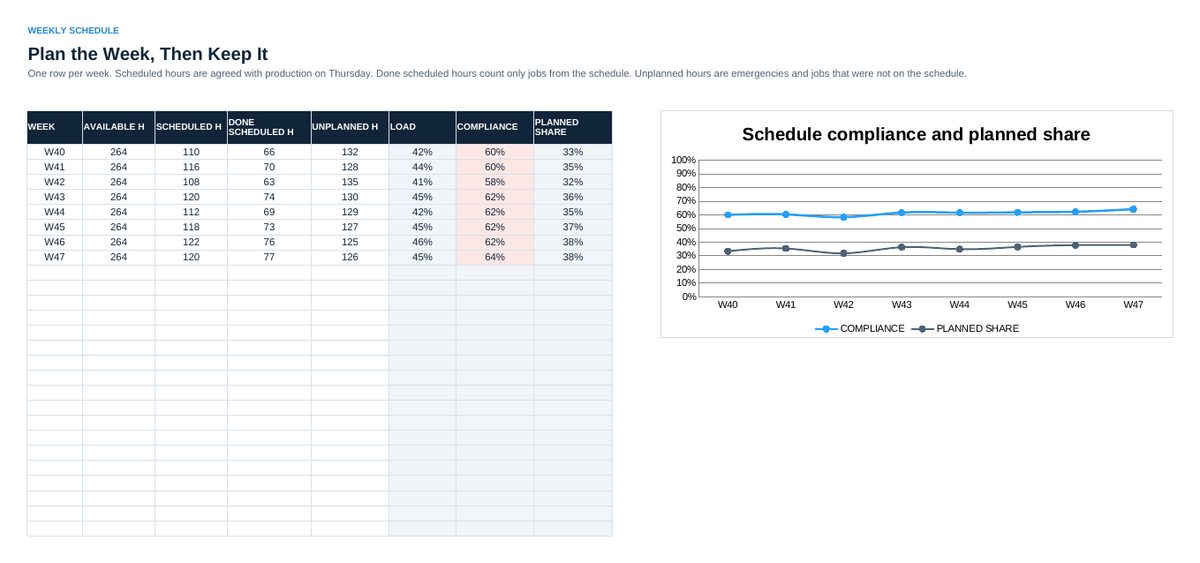
- Every Thursday: enter the scheduled hours in 05 Schedule. Every Friday: enter done scheduled hours and unplanned hours.
- Each quarter: enter operating hours, failures and repair hours per asset in 06 MTBF and MTTR. Read 07 Status every week.
Definitions used in the workbook
- Ready backlog in weeks: Hours of all jobs with status Ready divided by available hours per week. Healthy: 2 to 4 weeks.
- Schedule compliance: Done hours of scheduled jobs divided by scheduled hours. Target 85 percent.
- Planned share: Done scheduled hours divided by done scheduled plus unplanned hours. Target 70 percent.
- MTBF and MTTR: MTBF = (operating hours - repair hours) / failures. MTTR = repair hours / failures.
Sheets in the workbook
- Start
- Setup
- Assets
- Work Orders
- Schedule
- MTBF and MTTR
- Status
Who it is for
Maintenance managers and planners who want to plan instead of firefight.
The method behind the numbers
This workbook is part of the Maintenance Management toolkits. The Starter Kit adds the guide and the checklist for the first 30 days. The Excellence Bundle adds playbook, workshop pack, templates, deck and the complete Excel system.