How it works
- Open 07 Lists and enter your zones, areas and targets. Six to ten zones per area.
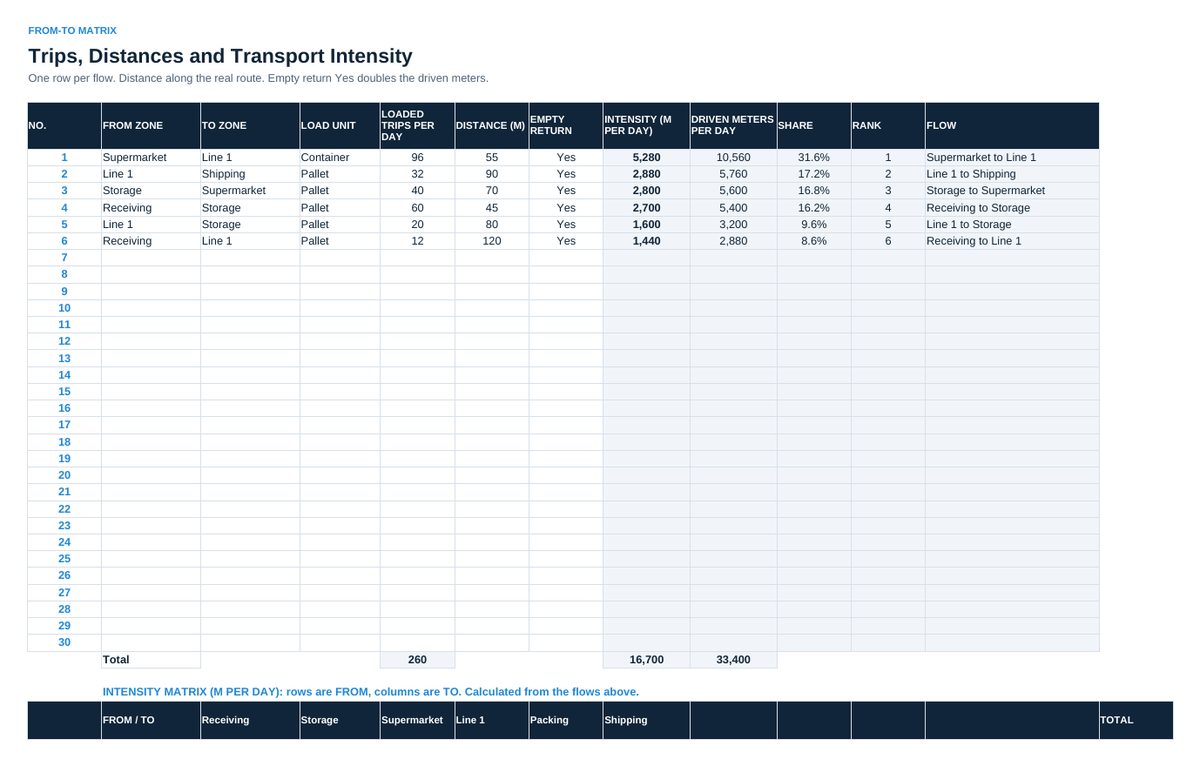
- Enter every flow in 02 From-To Matrix: from, to, loaded trips per day and the real route distance. Intensity, share, rank and the matrix calculate.
- Fill one row per day and area in 03 Picking Log: picking hours, order lines picked, lines with an error.
- Enter every counted location in 04 Count Log, counted blind. Record the cause of every difference.
- Read 05 Dashboard in the weekly review: picks per hour, error rate, accuracy, the largest flow.
- Agree one action per week in 06 Action Plan, with owner and date.
Definitions used in the workbook
- Transport intensity: Loaded trips per day times route distance in meters. Driven meters add the empty return where the vehicle drives back empty.
- Picks per hour: Order lines picked divided by picking hours (paid hours in the area).
- Picking error rate: Order lines with a wrong part, quantity or destination divided by order lines picked.
- Inventory accuracy: Locations counted with the right part and quantity divided by locations counted.
- Period values: Calculated from sums, never as an average of daily percentages.
Sheets in the workbook
- Start
- From-To Matrix
- Picking Log
- Count Log
- Dashboard
- Action Plan
- Lists
Who it is for
Logistics leads and warehouse supervisors.
The method behind the numbers
This workbook is part of the Intralogistics and Material Flow toolkits. The Starter Kit adds the guide and the checklist for the first 30 days. The Excellence Bundle adds playbook, workshop pack, templates, deck and the complete Excel system.