How it works
- Open 02 Setup. Enter the area, the cost per participant hour, the working weeks, the target and the status date.
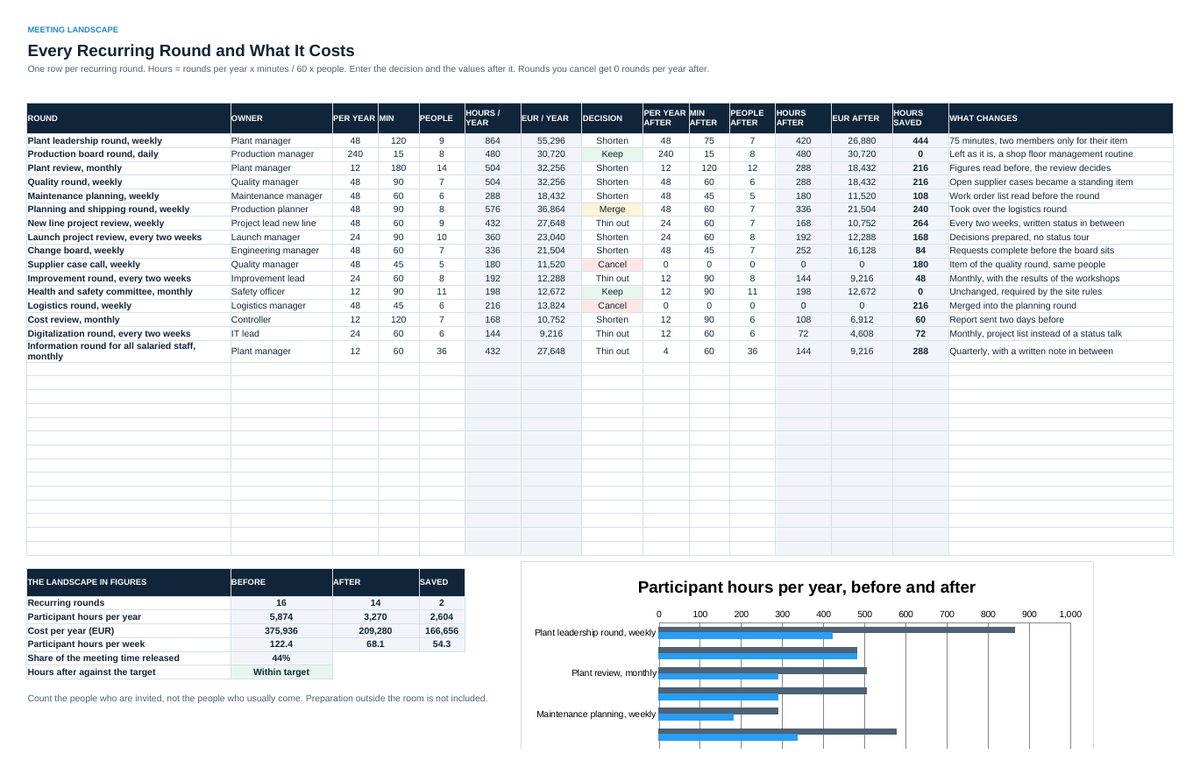
- List every recurring round in 03 Landscape with rounds per year, minutes and people. Hours and cost calculate.
- Enter the decision per round and the values after it. Read the saving and the chart below the list.
- Build the agenda of one round in 04 Agenda. The start times, the end time and the cost of the round calculate.
- Keep one task list in 05 Tasks. Read 06 Status in the monthly review.
Definitions used in the workbook
- Recurring round: A meeting that repeats with the same purpose and largely the same people.
- Participant hours: Rounds per year x length in hours x number of people invited.
- Item type: Information: nothing is open. Discussion: a view is wanted. Decision: a question, options and a decider are on the table.
- Closed by their date: Tasks closed on or before the due date, as a share of all tasks that were due by the status date.
Sheets in the workbook
- Start
- Setup
- Landscape
- Agenda
- Tasks
- Status
Who it is for
Plant, area and department managers who want fewer and shorter rounds that end with decisions.
The method behind the numbers
This workbook is part of the Meetings and Facilitation toolkits. The Starter Kit adds the guide and the checklist for the first 30 days. The Excellence Bundle adds playbook, workshop pack, templates, deck and the complete Excel system.