How it works
- Open 02 Setup. Enter area, quarter, first Monday of the quarter and the status date.
- Write your OKR in 03 OKR Set: up to three objectives, three or four key results each, with start value, target value, owner and type.
- Every week, enter the value and the confidence of each key result in 04 Check-ins. Current value, score and status update by themselves.
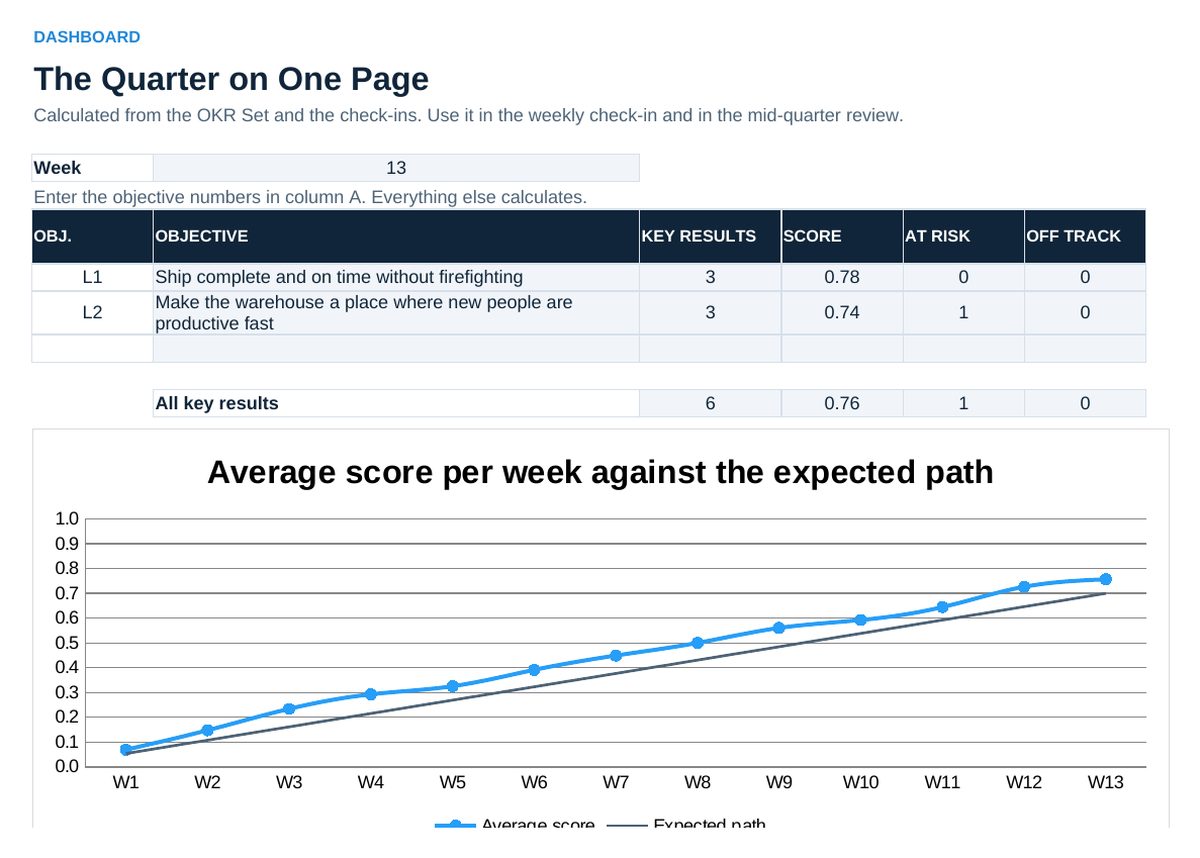
- Read 05 Dashboard in the check-in: score per objective, key results at risk, trend against the expected path, health metrics.
- Keep the work that moves the key results in 06 Initiatives. At the end of the quarter fill 07 Retrospective.
Definitions used in the workbook
- Score: Progress made divided by progress planned: (current minus start) divided by (target minus start), limited to 0.0 to 1.0. Works for targets above and below the start value.
- Objective score: Average of the scores of its key results.
- Status: Compares the score with the expected score at this point of the quarter: share elapsed times 0.7 for aspirational and times 1.0 for committed key results. A confidence below 7 sets at least At risk, below 4 Off track.
- Confidence: The owner’s forecast from 0 to 10 that the target will be reached. 7 means likely with the current plan.
Sheets in the workbook
- Start
- Setup
- OKR Set
- Check-ins
- Dashboard
- Initiatives
- Retrospective
Who it is for
Team and department leads who introduce OKR in operations.
The method behind the numbers
This workbook is part of the OKR toolkits. The Starter Kit adds the guide and the checklist for the first 30 days. The Excellence Bundle adds playbook, workshop pack, templates, deck and the complete Excel system.