How it works
- 02 Setup holds the quarter, the status date and the lists, including the teams. 03 Priorities holds the three to five priorities of the plant for the year.
- 04 OKR Set holds the OKR of all teams, one row per key result, with team and plant priority. 05 Check-ins holds values and confidence per week.
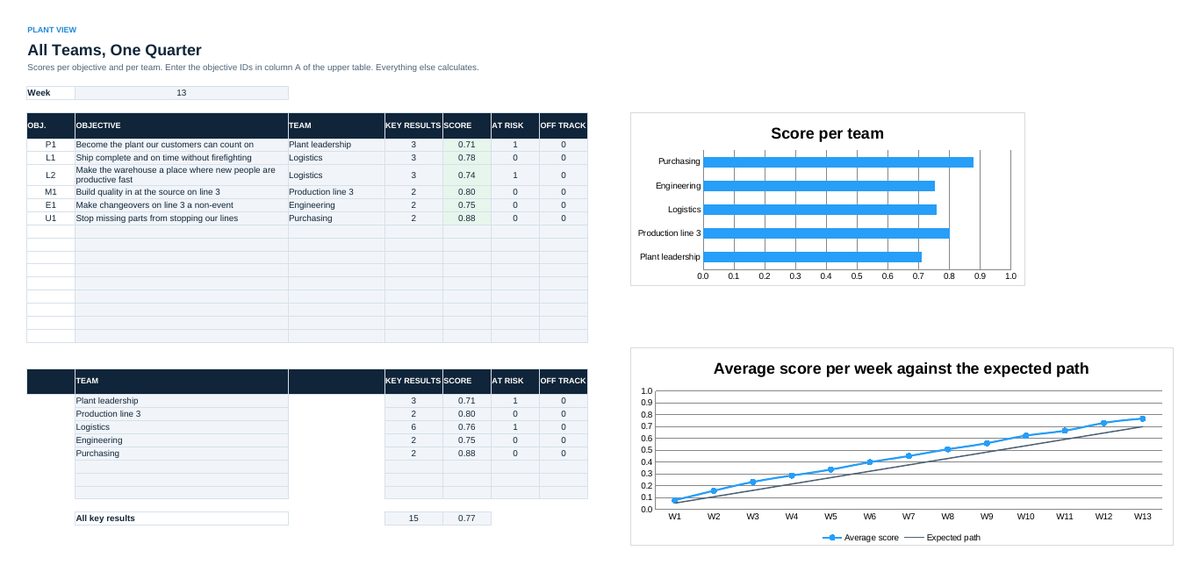
- 06 Plant View shows scores per objective and per team, key results at risk and the trend against the expected path.
- 07 Alignment maps team key results to the plant key results and shows gaps. 08 Dependencies holds the agreements between teams.
- 09 Initiatives, 10 Health Metrics and 11 Retrospective support the weekly and quarterly routine.
- 12 Audit holds the 25 statements per quarter, 13 Rollout the plan from one area to the whole plant.
Definitions used in the workbook
- Score: (current minus start) divided by (target minus start), limited to 0.0 to 1.0. Objective and team scores are averages of key result scores.
- Status: Score against the expected score at this point of the quarter: share elapsed times 0.7 (aspirational) or 1.0 (committed). Confidence below 7 means at least At risk, below 4 Off track.
- Rolling 13 weeks: For key results counted per quarter, such as complaints or line stops, enter the value of the last 13 weeks every week.
Sheets in the workbook
- Start
- Setup
- Priorities
- OKR Set
- Check-ins
- Plant View
- Alignment
- Dependencies
- Initiatives
- Health Metrics
- Retrospective
- Audit
- Rollout
Who it is for
Plants and business units that run OKR across many teams.
The method behind the numbers
This workbook is part of the OKR toolkits. The Starter Kit adds the guide and the checklist for the first 30 days. The Excellence Bundle adds playbook, workshop pack, templates, deck and the complete Excel system.