How it works
- 02 Setup holds project data, status date and lists. One file per project, plus one portfolio sheet that you can copy into a shared file.
- 03 Portfolio lists all projects with status, budget, indexes and priority score. Review it every month.
- 04 Schedule, 05 RACI, 06 Risks and 07 Changes hold the plan and control of one project.
- 08 Sprints tracks iterative workstreams: points planned and done per sprint, speed, and a burndown of the current sprint.
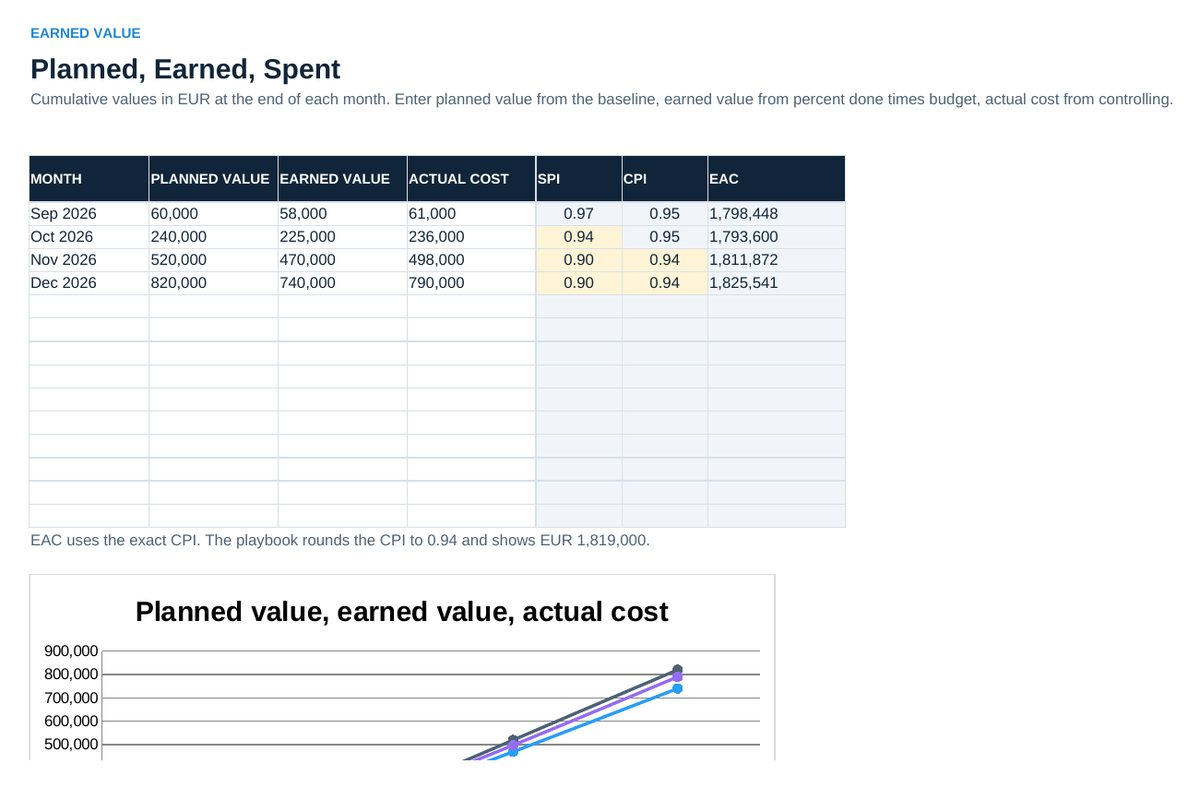
- 09 Earned Value calculates SPI, CPI and the estimate at completion from monthly planned value, earned value and actual cost.
- 10 Resources compares planned hours with available hours per person and month. 11 Audit holds the 25 statements, 12 Lessons the rules for the next project.
- Every week: update percent done in 04 Schedule, set the status date in 02 Setup, read 13 Status, record decisions and actions in 14 Decisions.
Definitions used in the workbook
- Load: Planned hours divided by available hours. Above 100 percent is a schedule risk now.
Sheets in the workbook
- Start
- Setup
- Portfolio
- Schedule
- RACI
- Risks
- Changes
- Sprints
- Earned Value
- Resources
- Audit
- Lessons
- Status
- Decisions
Who it is for
Project offices and engineering managers who steer several projects.
The method behind the numbers
This workbook is part of the Project Management toolkits. The Starter Kit adds the guide and the checklist for the first 30 days. The Excellence Bundle adds playbook, workshop pack, templates, deck and the complete Excel system.