How it works
- Open 02 Setup. Enter the status date, the planning limit, the minimum score, the weights of the five criteria and your bottleneck resources with people and share for projects.
- List every project in 03 Register: sponsor, class, benefit, budget, effort, the three scores, status, plan from, remaining months and the remaining person-days per resource.
- Read 04 Scoring: points, score, rank and the chart of benefit against effort. Must projects come first.
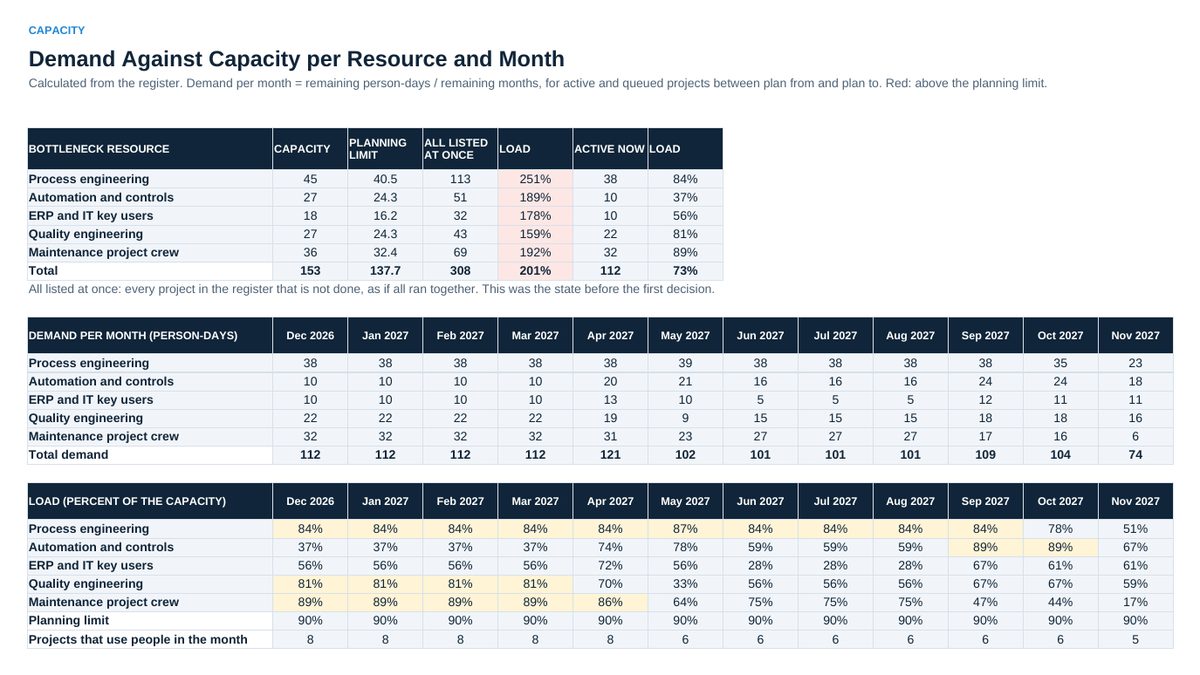
- Read 05 Capacity: demand against capacity now and for twelve months. Set the status and the start months in the register until no field is above the limit.
- Every month: enter three figures per active project in 06 Overview and read 07 Status before the portfolio board.
Definitions used in the workbook
- Project: A one-time undertaking with a defined result and an end, above your thresholds for effort, cost or departments involved.
- Score: Sum of weight x points, divided by 5. Maximum 100. Risk and effort are scored in reverse.
- Demand per month: Remaining person-days of a bottleneck resource divided by the remaining months of the project.
- Planning limit: Share of the capacity that may be planned. A project starts only when every resource it needs stays at or below it.
Sheets in the workbook
- Start
- Setup
- Register
- Scoring
- Capacity
- Overview
- Status
Who it is for
Plant and site managers who want to see all projects in one list and start only what their key people can carry.
The method behind the numbers
This workbook is part of the Project Portfolio and PMO toolkits. The Starter Kit adds the guide and the checklist for the first 30 days. The Excellence Bundle adds playbook, workshop pack, templates, deck and the complete Excel system.