How it works
- Open 07 Lists. Check the workstreams, the aging limits per priority, the full rate per week and the exit rule. Enter the review date or leave it empty to use today.
- In 02 Workstreams, enter the lead, the reported light and the level of each workstream every week. The rule light calculates from the issue list.
- Enter every open point in 03 Issue List with workstream, priority, owner and due date. Enter the closing date when it is closed.
- In 04 Ramp-Up, enter planned output and first pass yield target per week before the start of production. Add actual output and right first time units every week.
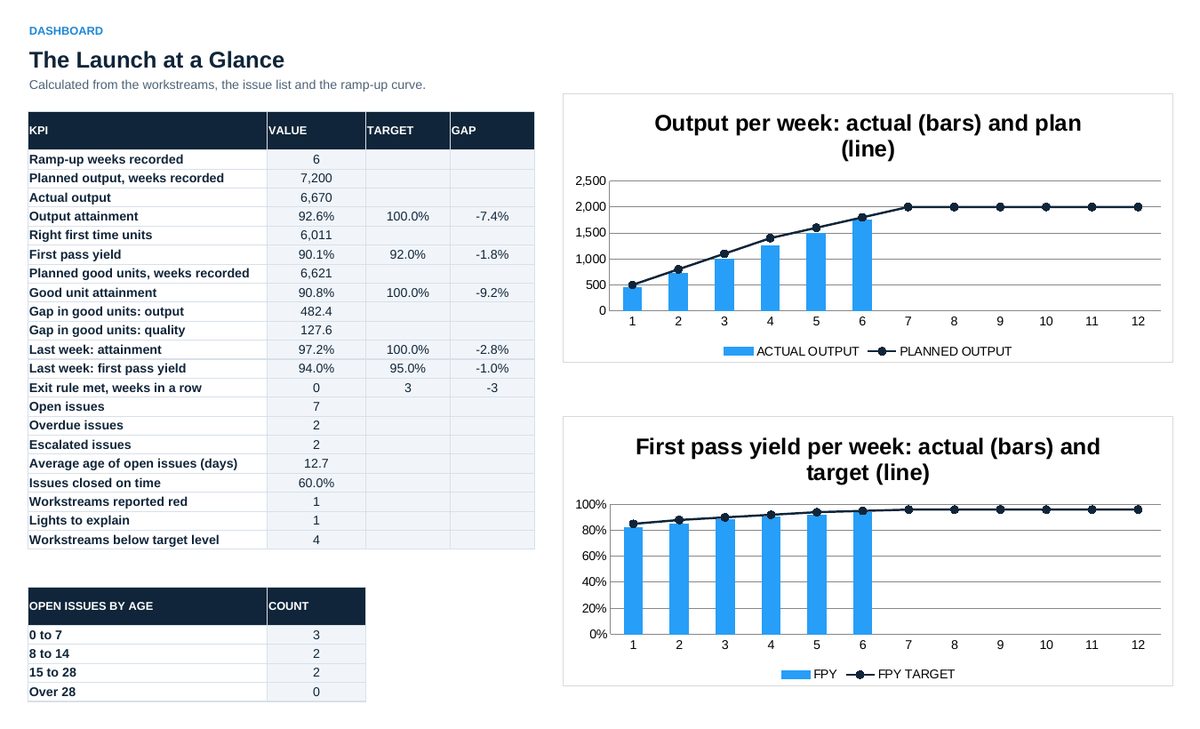
- Read 05 Dashboard in the weekly status: attainment, first pass yield, the gap in good units, issues past their limit, lights.
- Agree actions in 06 Action Plan, with owner and date.
Definitions used in the workbook
- Output attainment: Actual output divided by planned output, added up over the weeks with actual data.
- First pass yield: Units right first time, without rework or scrap, divided by units started. Actual output counts every unit started in the week.
- Good unit attainment: Right first time units divided by planned good units (planned output times target first pass yield).
- Age: Days from raised to closed, or to the review date while open. Past the limit: launch manager. Past twice the limit: sponsor.
- Rule light: Red if an issue of the workstream is past its limit. Amber if more than two issues are open or one is overdue. Otherwise green.
Sheets in the workbook
- Start
- Workstreams
- Issue List
- Ramp-Up
- Dashboard
- Action Plan
- Lists
Who it is for
Launch and project managers who bring a new product into series production.
The method behind the numbers
This workbook is part of the Launch Management toolkits. The Starter Kit adds the guide and the checklist for the first 30 days. The Excellence Bundle adds playbook, workshop pack, templates, deck and the complete Excel system.