How it works
- Open 02 Setup. Enter the plant or area, the targets, the status date and the figures of last year.
- 03 Hazards: list activities and hazards with the people who do the work. Rate severity and likelihood from 1 to 4.
- 03 Hazards and 04 Actions: choose the main measure and its level for every hazard. Give every measure an owner, a date and interim protection.
- 05 Events: enter accidents, first aid cases and near misses with their potential and the main cause group.
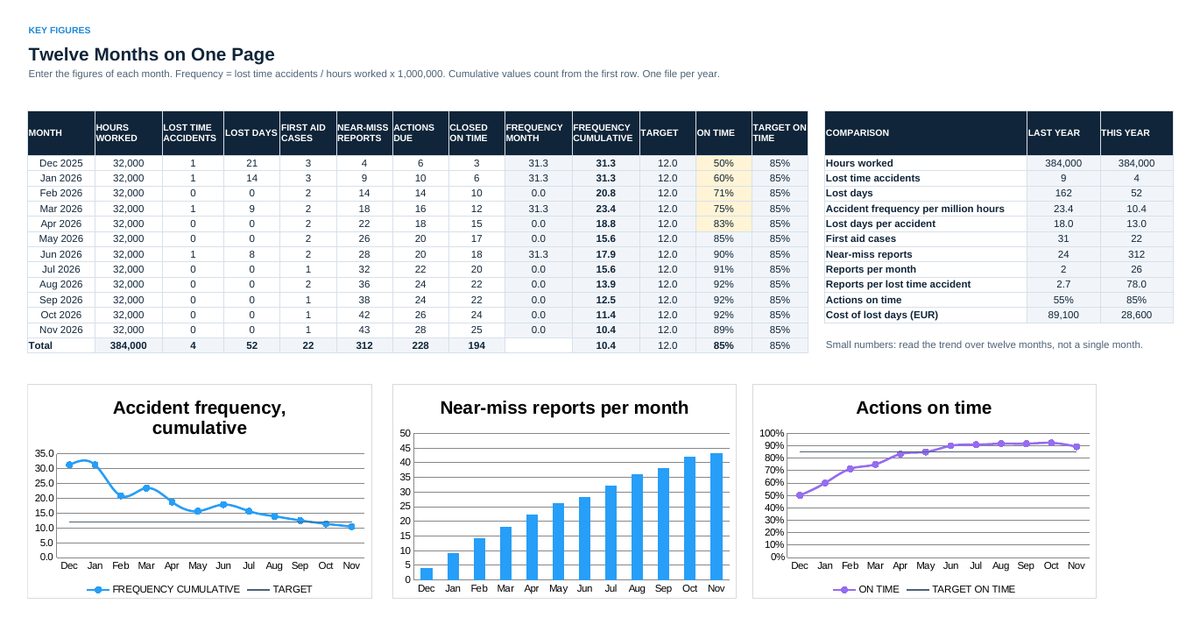
- 06 Key Figures: enter the figures of each month. Read 07 Status every week at the board.
Definitions used in the workbook
- Risk score: Severity x likelihood, 1 to 16. High from 9, medium 4 to 8, low 1 to 3. An own scale of the example plant. Use the scale of your plant if one exists.
- Levels: 1 eliminate, 2 substitute, 3 engineering, 4 organizational, 5 personal. Start at the top and go down only when the level above is not possible.
- Lost time accident: In this workbook: an accident at work with at least one full lost day after the day of the event. Keep your own definition fixed.
- Accident frequency: Lost time accidents / hours worked x 1,000,000.
Sheets in the workbook
- Start
- Setup
- Hazards
- Actions
- Events
- Key Figures
- Status
Who it is for
Area managers and supervisors who assess one area with their team and want every high risk to have an owner.
The method behind the numbers
This workbook is part of the Occupational Safety and Health toolkits. The Starter Kit adds the guide and the checklist for the first 30 days. The Excellence Bundle adds playbook, workshop pack, templates, deck and the complete Excel system.