How it works
- Open 06 Lists. Set the cost rate in EUR per hour and the production weeks per year, agreed with finance. Enter your areas and machines.
- After every waste walk, enter each finding in 02 Waste Log: type, what you saw, how often and how long, or the material cost per week.
- Enter every changeover in 03 Changeover Log with internal and external minutes. Mark the phase Before or After the improvement.
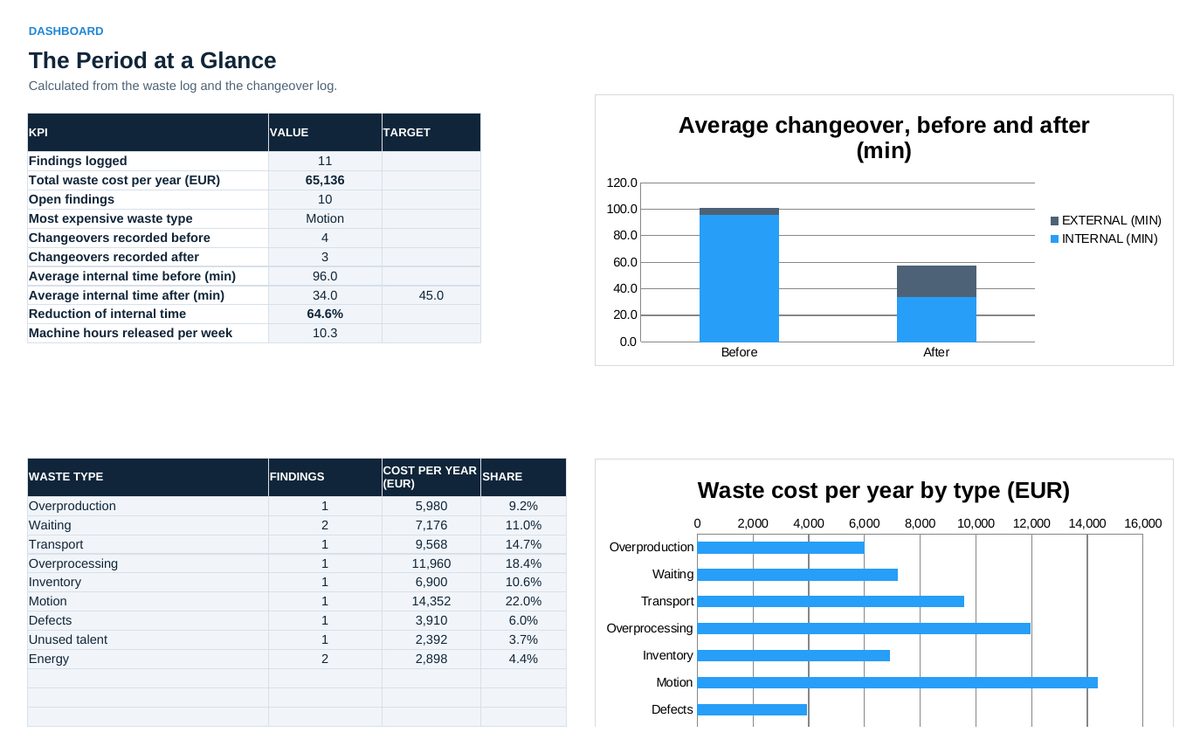
- Read 04 Dashboard in the weekly review: total waste cost, the most expensive type, changeover time before and after.
- Agree one action per week in 05 Action Plan, with owner, date and the expected saving.
Definitions used in the workbook
- Cost per week: Minutes per week divided by 60 times the cost rate, plus material or other cost per week.
- Cost per year: Cost per week times production weeks per year.
- Internal time: Changeover work that needs the machine stopped. This is the changeover time that counts.
- External time: Changeover work done while the machine still runs.
Sheets in the workbook
- Start
- Waste Log
- Changeover Log
- Dashboard
- Action Plan
- Lists
Who it is for
Supervisors and lean coaches who run waste walks and SMED workshops.
The method behind the numbers
This workbook is part of the Waste Elimination toolkits. The Starter Kit adds the guide and the checklist for the first 30 days. The Excellence Bundle adds playbook, workshop pack, templates, deck and the complete Excel system.