How it works
- Open 02 Setup. Check the working weeks, the class limits, the service level per class, the holding cost rate, the cost per order and the status date.
- Enter your items in 03 Items: price, lead time and its standard deviation, minimum quantity, pack size, stock, open orders and the goods issues of the last 13 weeks.
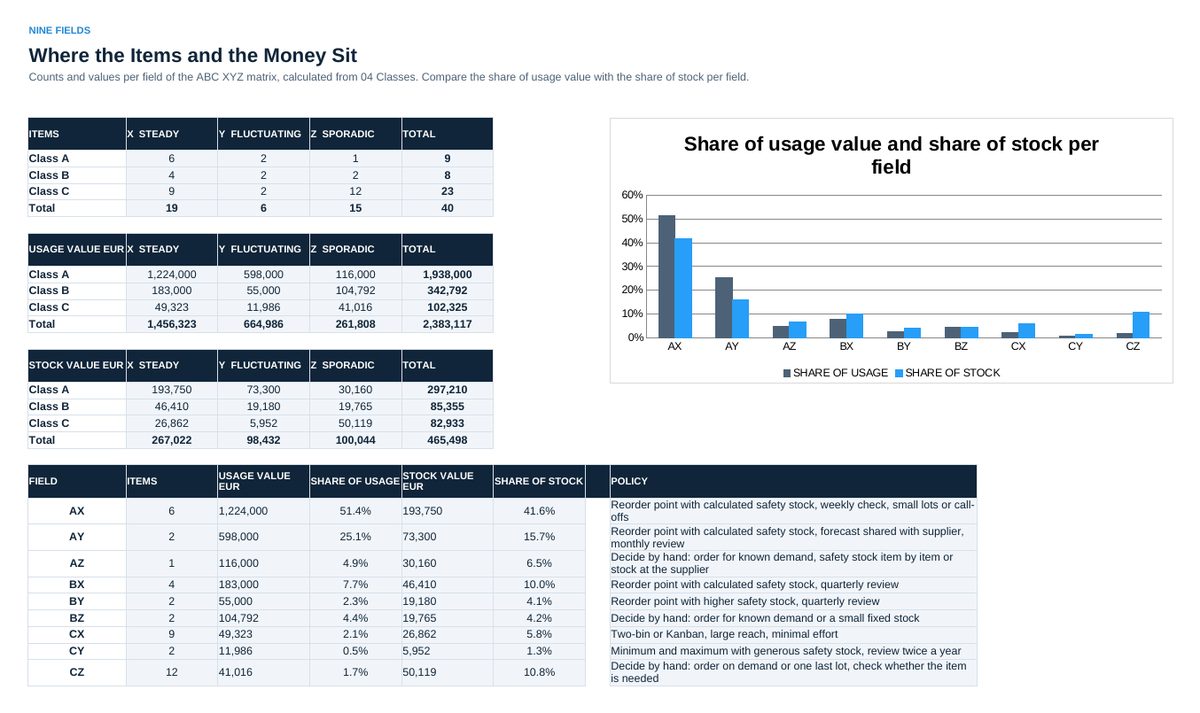
- Read 04 Classes: ABC by usage value, XYZ by coefficient of variation, the field of each item. 05 Matrix shows items, usage value and stock per field.
- Read 06 Parameters: safety stock, reorder point, order quantity, maximum and the status of each item. Check Z items by hand before you use their values.
- Enter the parameters in your system. Open 07 Status every week, update stock and open orders in 03 Items, and work off the list.
Definitions used in the workbook
- Safety stock: z x SQRT(L x sD^2 + d^2 x sL^2), rounded up. z from the service level with NORMSINV, d and sD from the 13 weeks, L and sL in weeks.
- Reorder point: d x L + safety stock. Order when stock on hand plus open orders is at or below the reorder point.
- Order quantity: Economic order quantity SQRT(2 x annual demand x cost per order / (unit price x holding cost rate)), rounded to the pack size, not below the minimum quantity, not above the maximum reach.
- Target stock: Safety stock + half the order quantity. Maximum = reorder point + order quantity.
Sheets in the workbook
- Start
- Setup
- Items
- Classes
- Matrix
- Parameters
- Status
Who it is for
Materials planners and buyers who want calculated parameters instead of stock by feeling.
The method behind the numbers
This workbook is part of the Inventory Management toolkits. The Starter Kit adds the guide and the checklist for the first 30 days. The Excellence Bundle adds playbook, workshop pack, templates, deck and the complete Excel system.