How it works
- Open 02 Setup. Enter the project name, name the periods (months, four week blocks or quarters) and set the limits for amber and red.
- List the work packages in 03 Plan with owner and budget. Spread each budget over the periods in which the work is planned. The check column shows OK when the plan adds up to the budget.
- At the end of every period enter the percent complete of each work package in 04 Progress. Cumulative, judged against the definition of done, not against the money spent.
- Enter the actual cost of the period per work package in 05 Actual Cost, including invoices booked and work done but not yet invoiced.
- Set the status period in 02 Setup. Read 06 Analysis by period and by work package.
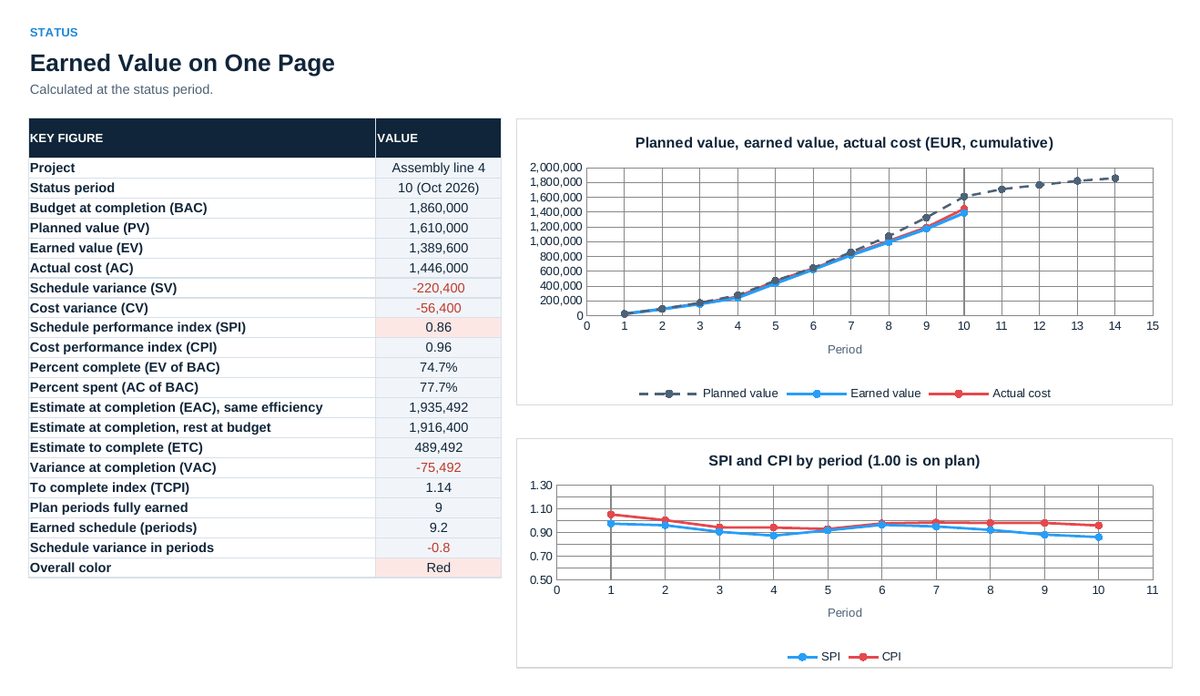
- Use 07 Status in the steering committee: indexes, forecast at completion and the chart of planned value, earned value and actual cost.
Definitions used in the workbook
- SV and CV: Schedule variance is EV minus PV, cost variance is EV minus AC. Negative means behind schedule or over cost.
- SPI and CPI: Schedule performance index is EV divided by PV, cost performance index is EV divided by AC. Below 1.00 means behind schedule or over cost.
- BAC and EAC: Budget at completion is the sum of all budgets. Estimate at completion is BAC divided by CPI: the total cost if the cost efficiency stays as it is. The second estimate, AC plus BAC minus EV, assumes that the rest of the work runs at budget.
- Earned schedule: The point in the plan at which the earned value of today was due, in periods. Minus the status period it gives the schedule variance in periods.
Sheets in the workbook
- Start
- Setup
- Plan
- Progress
- Actual Cost
- Analysis
- Status
Who it is for
Project managers and controllers of investment and development projects in industry.
Cheaper in the pack
This workbook is part of the Project and Cost Tool Pack (EUR 129), which holds all 20 Excel tools of this topic area, and of the Excel Tools Complete Library with all 100 tools.