How it works
- Open 02 Setup. Enter the report date, your targets for lead time, open changes and rush share, and the hourly rate.
- Enter every change in 03 Register with class, reason and the date of the request. Add the other dates as they happen.
- Evaluate each new request in 04 Evaluation: six dimensions, one-time cost, effect per year, earliest effective date.
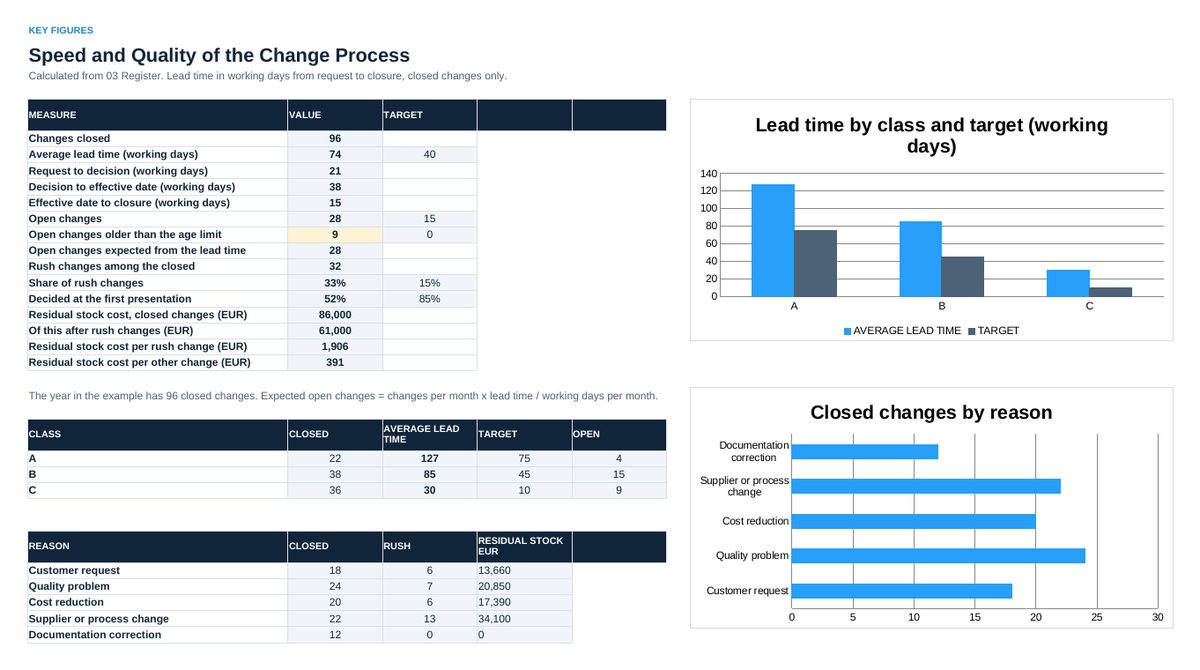
- Read 05 Key Figures: lead time by class, open changes, rush share, residual stock cost.
- Bring 06 Status to the monthly review.
Definitions used in the workbook
- Change: Every planned change to something that was released: a document, a part, a process, a tool or a source of supply.
- Classes: A: form, fit, function or customer affected. B: process, tool, source or supplier. C: documents only.
- Rush change: A change introduced before evaluation and decision.
- Lead time: Working days from the request to the closure, Monday to Friday. Plant holidays are not counted.
Sheets in the workbook
- Start
- Setup
- Register
- Evaluation
- Key Figures
- Status
Who it is for
Engineers, quality and operations managers who want every technical change numbered, evaluated and decided.
The method behind the numbers
This workbook is part of the Engineering Change and Part Approval toolkits. The Starter Kit adds the guide and the checklist for the first 30 days. The Excellence Bundle adds playbook, workshop pack, templates, deck and the complete Excel system.