How it works
- Open 02 Setup. Enter the process, the owner, the team and the dates.
- Read 03 Rating Guide with the team. Add one anchor from your own products per level. Change the base table if your customer prescribes a logic.
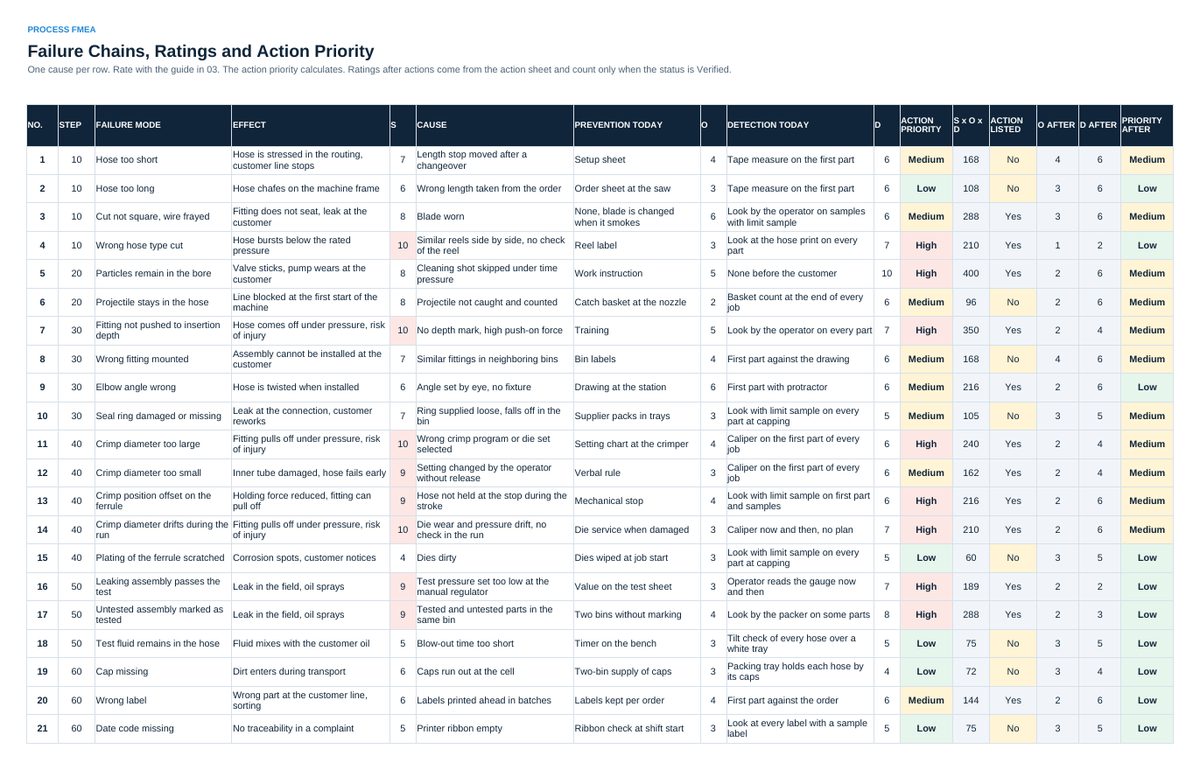
- Fill 04 FMEA: one row per cause with step, failure mode, effect, cause and the controls of today. Rate severity, occurrence and detection from 1 to 10.
- Read the action priority. List an action in 05 Actions for every High row and decide on the Medium rows.
- When an action is in place and its effect is proven, set the status to Verified. The FMEA then shows the new ratings and the priority after.
- Read 06 Status in every review.
Definitions used in the workbook
- Failure mode: How the process step fails to do its job, in the words of the requirement.
- Effect: What happens then, for the next step, the customer plant and the end user. The worst effect sets the severity.
- Cause: Why the failure mode could happen at this step. Specific enough to name an action against it.
- Action priority: High, Medium or Low. Calculated from severity first, then occurrence, then detection, with the base table in 03 Rating Guide.
Sheets in the workbook
- Start
- Setup
- Rating Guide
- FMEA
- Actions
- Status
Who it is for
Process and quality engineers who run their first process FMEA with a team.
The method behind the numbers
This workbook is part of the FMEA and Control Plan toolkits. The Starter Kit adds the guide and the checklist for the first 30 days. The Excellence Bundle adds playbook, workshop pack, templates, deck and the complete Excel system.