How it works
- Open 02 Setup. Enter the project name and the status date and adapt the lists of owners and categories to your project.
- Record every open point in 03 Open Items as soon as it comes up: what is open, one owner, one due date, a priority. One point per row.
- Go through the list in every weekly meeting, overdue items first. Update status, comment and, if needed, the due date. Enter the closing date when an item is done.
- Read 04 Analysis: active, overdue and due soon per owner, by status, by priority, by category and by age.
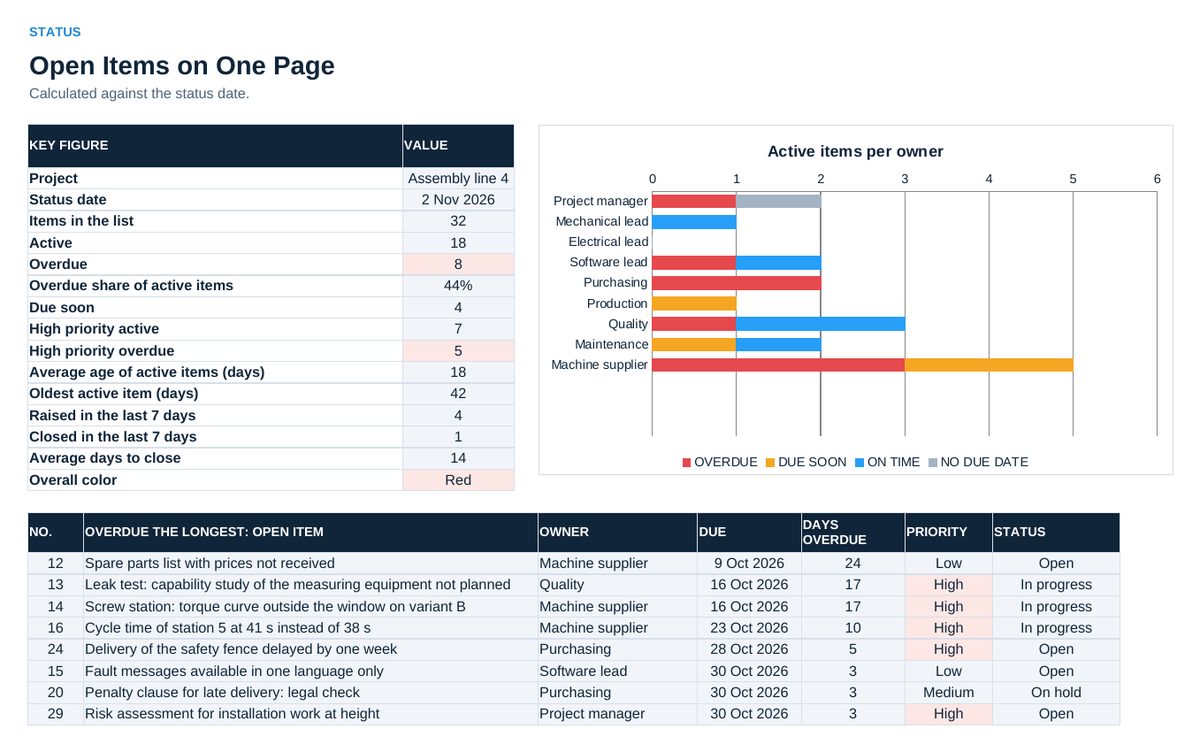
- Use 06 Status for the report: key figures, the chart per owner and the items that are overdue the longest. 05 Charts holds the other charts.
- Once a week copy the three numbers at the top of 07 Trend into the next free row. The chart shows whether the list grows or shrinks.
Definitions used in the workbook
- Active: Every item that is not Done and not Canceled. Open, In progress and On hold are active.
- Flag: Overdue: active and the due date is before the status date. Due soon: due within the window set in 02 Setup, 7 days in the example. On time: due later. No due date: active without a date.
- Age: Days from the day the item was raised to the status date, for closed items to the closing date.
- Overall color: Red when the share of overdue items among the active items reaches the limit in 02 Setup. Amber when at least one item is overdue. Otherwise green.
Sheets in the workbook
- Start
- Setup
- Open Items
- Analysis
- Charts
- Status
- Trend
Who it is for
Project managers and team leaders who run weekly project or site meetings.
Cheaper in the pack
This workbook is part of the Project and Cost Tool Pack (EUR 129), which holds all 20 Excel tools of this topic area, and of the Excel Tools Complete Library with all 100 tools.