How it works
- Open 02 Setup. Enter the site, employees, sales, the hour rate and the status date.
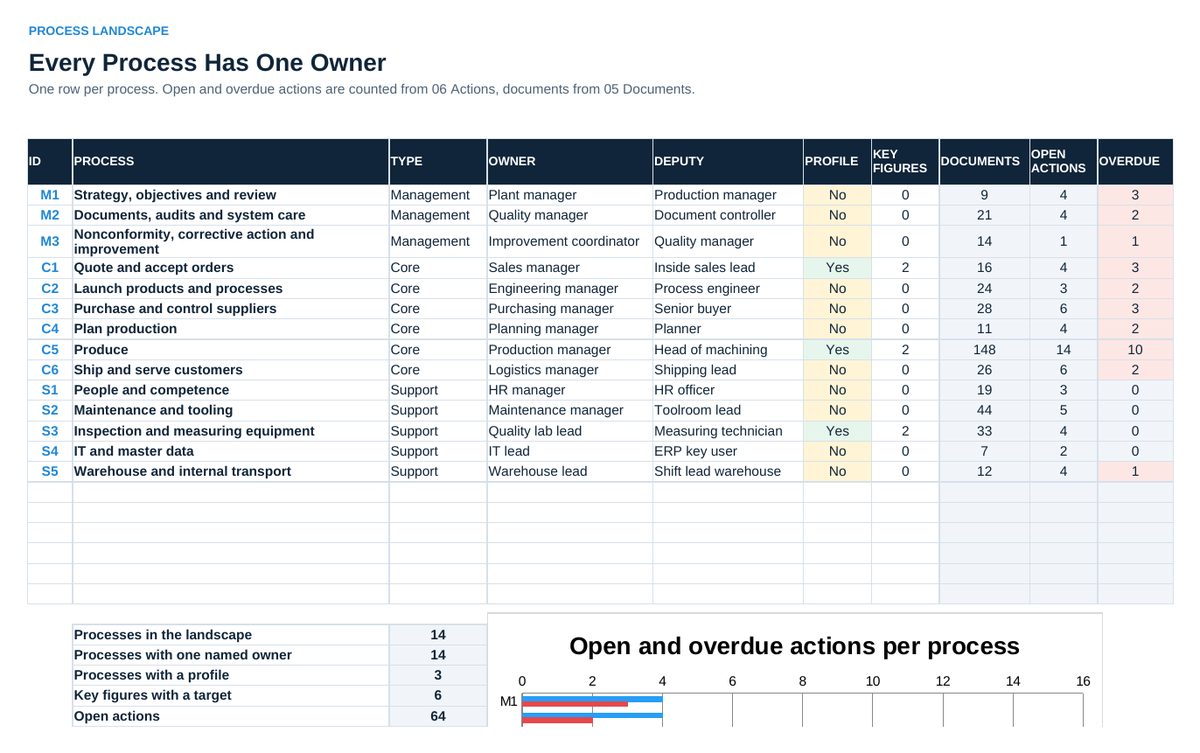
- 03 Processes: one row per process of your landscape with type, owner and deputy. Mark whether the one-page profile exists and how many key figures have a target.
- 04 Objectives: at most eight objectives with measure, owner, baseline and target. Enter the monthly values.
- 05 Documents: count your controlled documents per process and decide: keep, merge, withdraw or reclassify. The target number calculates.
- 06 Actions: merge all action lists into this register. Review the overdue actions every week. Read 07 Status in the management meeting.
Definitions used in the workbook
- Process owner: One person by name who answers for the result of a process and may change it.
- Process profile: One page per process: purpose, owner, inputs, results, key figures, risks, documents.
- Open action: Status open or in progress. A corrective action stays open until its effect was checked.
- Closed by the due date: Open actions that are not overdue divided by all open actions.
Sheets in the workbook
- Start
- Setup
- Processes
- Objectives
- Documents
- Actions
- Status
Who it is for
Plant and quality managers who want a management system on a few pages, with owners, numbers and one list of actions.
The method behind the numbers
This workbook is part of the Quality Management System toolkits. The Starter Kit adds the guide and the checklist for the first 30 days. The Excellence Bundle adds playbook, workshop pack, templates, deck and the complete Excel system.