How it works
- Open 02 Setup. Enter the site, the status date, the revenue and the cost of one lost production day, then agree the three scales and the thresholds.
- Write every risk into 03 Register as cause, event and effect with one named owner. Enter the probability per year and the impact in EUR.
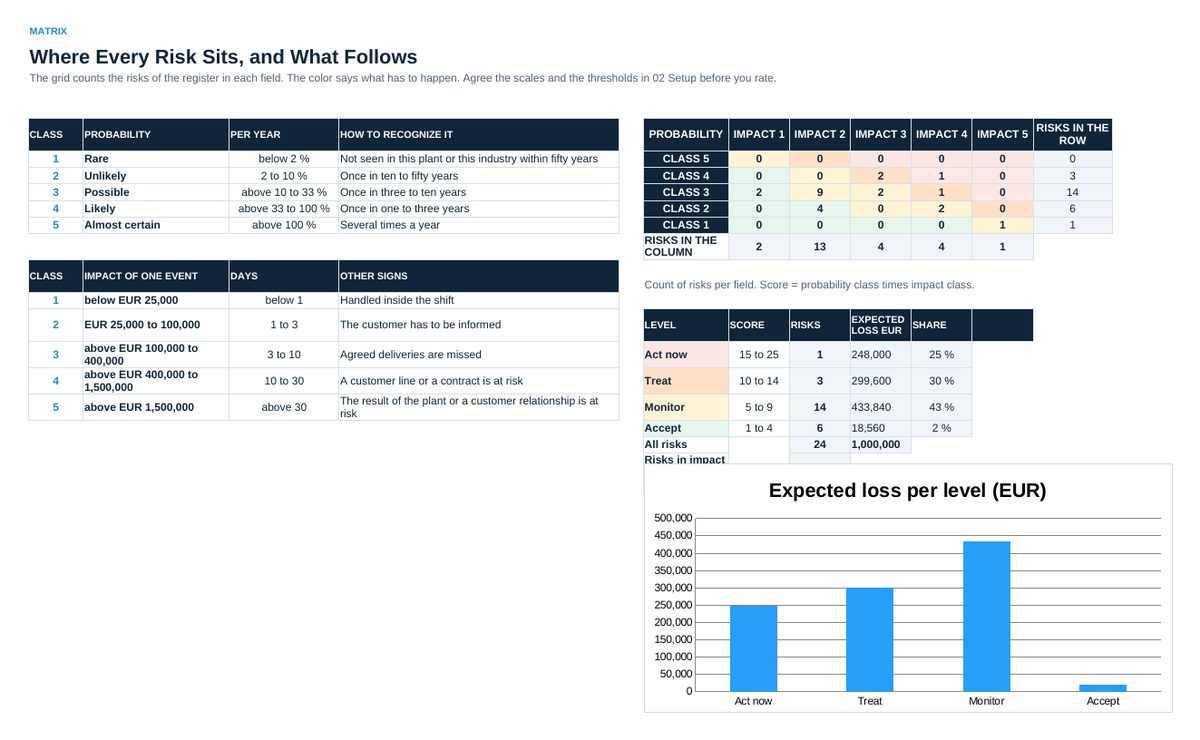
- Read 04 Matrix: how many risks sit in each field, what has to happen in each level and how the expected loss is spread.
- Enter the measures in 05 Measures with cost, owner and date, and put the measure id into the register next to the risk it treats.
- Enter the residual probability and the residual impact in the register. 05 Measures calculates what each measure removes and in which order to work.
- List the largest risks in 06 Top Risks for the management report. Read 07 Status before every review.
Definitions used in the workbook
- Risk: A cause, an event and an effect, with one named owner. Without all three it is a concern, not a risk.
- Score: Probability class times impact class, from 1 to 25. The score decides what has to happen.
- Expected value: Probability per year times impact in EUR. The only field that can be summed, so it gives the order of work.
- Residual risk: The probability and the impact that are left after the measure, rated on the same scale.
Sheets in the workbook
- Start
- Setup
- Register
- Matrix
- Measures
- Top Risks
- Status
Who it is for
Plant and site managers who want their risks written down, rated in EUR and in days, and decided instead of discussed.
The method behind the numbers
This workbook is part of the Operational Risk Management toolkits. The Starter Kit adds the guide and the checklist for the first 30 days. The Excellence Bundle adds playbook, workshop pack, templates, deck and the complete Excel system.