How it works
- Open 02 Setup. Enter the plant, revenue and operating result. Check the list of categories and the list of requesters.
- Paste your spend into 03 Spend Data: one row per supplier and category with requester, amount, ordered by purchasing and under contract.
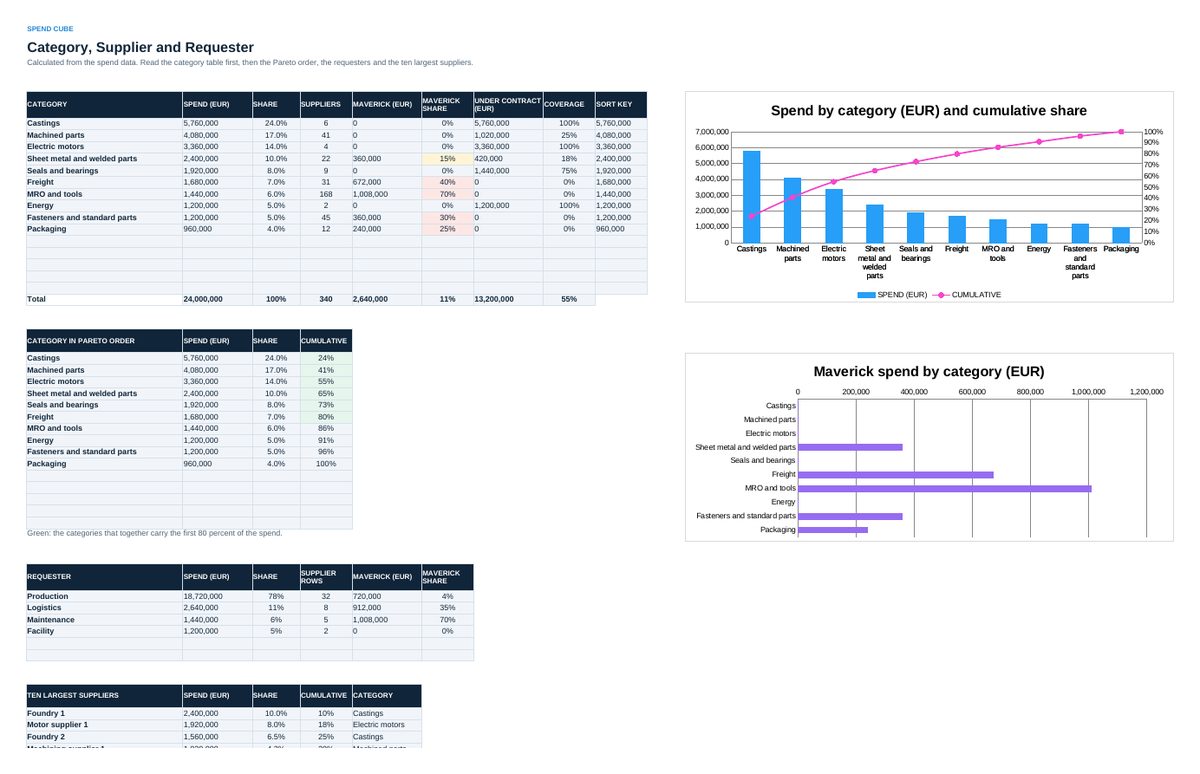
- Read 04 Spend Cube: spend, suppliers, maverick share and contract coverage per category, the Pareto order, the requesters and the ten largest suppliers.
- Score the categories in 05 Portfolio together with the requesters. The sheet places each category in one of four fields.
- Write the strategy of the pilot category in 06 Strategy. 07 Status is the one-page summary.
Definitions used in the workbook
- Spend: Paid invoices of twelve months without tax, in EUR.
- Maverick spend: Spend that was ordered without purchasing or outside an existing agreement.
- Contract coverage: Share of spend that falls under a valid frame contract or price agreement.
- Fields: Bundle: high influence, low risk. Partner: high influence, high risk. Secure: low influence, high risk. Simplify: low influence, low risk.
Sheets in the workbook
- Start
- Setup
- Spend Data
- Spend Cube
- Portfolio
- Strategy
- Status
Who it is for
Heads of purchasing and buyers who want to see where the money goes before they set targets.
The method behind the numbers
This workbook is part of the Strategic Procurement toolkits. The Starter Kit adds the guide and the checklist for the first 30 days. The Excellence Bundle adds playbook, workshop pack, templates, deck and the complete Excel system.