How it works
- Open 02 Setup. Describe the decision, name up to 6 alternatives, up to 10 criteria and the must criteria. Write down for every criterion what a score of 10 means.
- Compare the criteria in pairs in 03 Paired Comparison: 2 when the criterion in the row is more important, 1 when both are equal, 0 when the criterion in the column is more important. The sheet proposes weights.
- Enter the weights in 04 Scoring. Take the proposal or adjust it with the team. The check turns OK when the weights add up to 100 percent.
- Score every alternative on every criterion from 0 to 10 and answer the must criteria with Yes or No. Score criterion by criterion, not alternative by alternative.
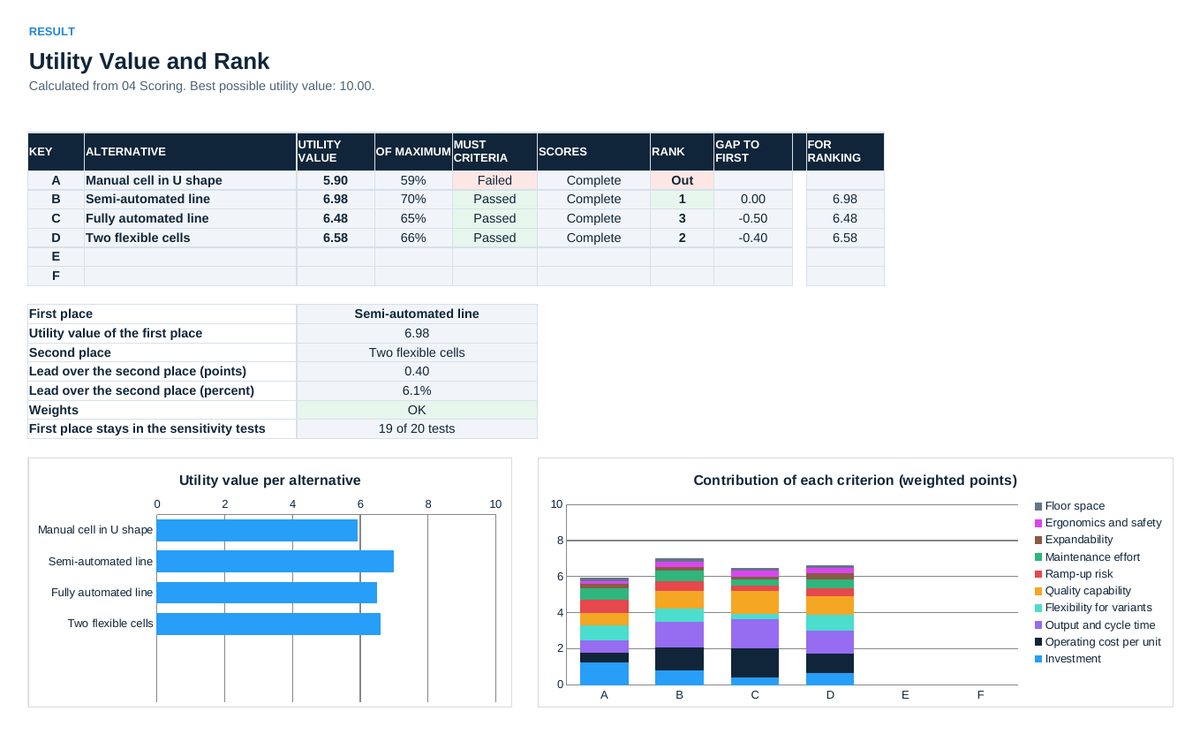
- Read 05 Result: utility value, rank and the contribution of each criterion. Alternatives that fail a must criterion are excluded from the ranking.
- Test the result in 06 Sensitivity before you decide. Record the decision with reasons in 07 Decision.
Definitions used in the workbook
- Utility value: Sum of weight times score over all criteria. With scores from 0 to 10 the best possible value is 10.00.
- Must criterion: A condition without trade-off. An alternative that fails one is out, whatever its utility value.
- Paired comparison: Each criterion is compared with each other one. The points of a row plus 1 for the criterion itself, divided by all points, give the proposed weight. The 1 keeps the least important criterion above zero.
- Sensitivity: The weight of one criterion is changed while the other weights keep their proportions. If the first place changes with a small shift, the decision is not robust and needs a second look.
Sheets in the workbook
- Start
- Setup
- Paired Comparison
- Scoring
- Result
- Sensitivity
- Decision
Who it is for
Project managers, engineers and buyers who prepare a concept, supplier or site decision.
Cheaper in the pack
This workbook is part of the Project and Cost Tool Pack (EUR 129), which holds all 20 Excel tools of this topic area, and of the Excel Tools Complete Library with all 100 tools.