How it works
- 02 Setup: the area, its operating days, the paid hours per shift, the measured utilization, the allowance for variation and the rates.
- 03 Program: one row per product family with units and work content. The sheet calculates productive hours and attendance hours.
- 04 Availability: calendar days down to net attendance days and hours per employee, and the attendance factor.
- 05 Requirement: attendance hours divided by net working time, plus the allowance, gives the head count to roster.
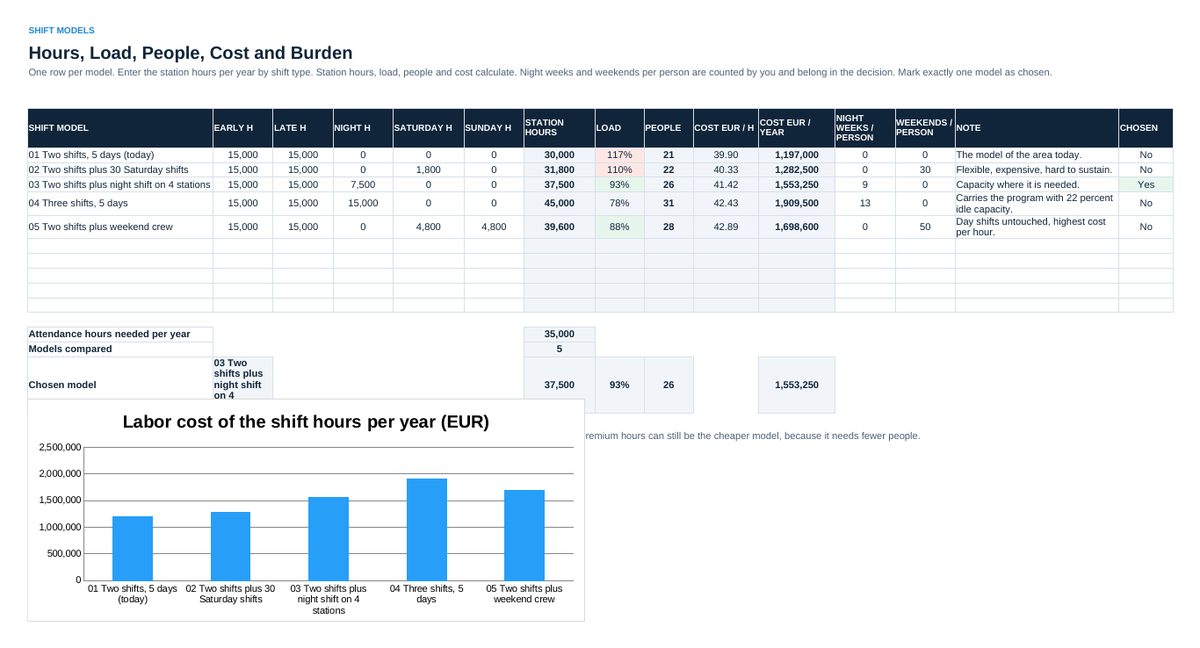
- 06 Shift Models: enter the station hours per year by shift type for each model. Station hours, load, people and cost calculate.
- 07 Status: the area on one page for the monthly review.
Definitions used in the workbook
- Productive hours: Units x work content per unit / 60. The hours the product needs.
- Attendance hours: Productive hours / utilization. The hours you have to pay for at the stations.
- Net attendance days: Gross working days minus vacation, absence and training. The days one employee is at a station.
- Attendance factor: Net attendance days / gross working days. Every crew size follows from it.
- Station hours: Stations x operating days x shifts x paid hours. A station that is switched off produces nothing, however many people are in the area.
Sheets in the workbook
- Start
- Setup
- Program
- Availability
- Requirement
- Shift Models
- Status
Who it is for
Production and area managers who have to say how many people a production area needs and in which shifts.
Cheaper in the pack
This workbook is part of the Leadership and Management Tool Pack (EUR 129), which holds all 16 Excel tools of this topic area, and of the Excel Tools Complete Library with all 100 tools.
The method behind the numbers
This workbook is part of the Workforce Planning and Shift Scheduling toolkits. The Starter Kit adds the guide and the checklist for the first 30 days. The Excellence Bundle adds playbook, workshop pack, templates, deck and the complete Excel system.